Google's Preferred Sources Button Is Still Sitting There Unclaimed
Google's Preferred Sources button is a real AI Overviews lever — but only if you check eligibility first.
Live since May 27, 2026, with over 600,000 sites already selected. Most coverage skips the one prerequisite that decides whether embedding the code does anything at all.
A client asked me on a call this week whether it was worth bothering with a Google feature she'd seen mentioned twice in the same day — a button that supposedly gets you highlighted inside AI answers.
She figured it was a publisher thing, built for outlets bigger than hers, and was ready to skip it entirely.
That assumption got me thinking — and led to this blog — because it’s backward, and correcting it changes what you do first.
more likely a reader clicks through once you're their Preferred Source
Over 600,000 sites already selected across the web. Source: Google, May 2026.
Google's own numbers say people are twice as likely to click through to a site once they've marked it a Preferred Source, and more than 600,000 sites have already been selected across the web. That's real, free reach — not a publisher-only feature, not a paywalled tool, not a months-long project.
Here's what many of the write-ups on this topic this week left out. The button doesn't make you eligible. It only works if your site already shows up in Google's own source preferences tool.
Embed the code on a site that isn't there yet, and you've spent five minutes on a task that changes nothing.
- Preferred Sources now shows inside AI Overviews and AI Mode, not just Top Stories — extended May 27, 2026.
- The button only works if your site already appears in Google’s source preferences tool — check before you embed anything.
- Only domain- and subdomain-level sites qualify; a subdirectory doesn’t count on its own.
- Three ways to add it: a two-line JavaScript button (recommended), a custom-styled version, or a no-code deeplink.
- Google says people are twice as likely to click a Preferred Source, and over 600,000 sites have already been selected.
What is Google's Preferred Sources button?
Preferred Sources is Google's way of letting a reader tell Google directly: I trust this site, show me more of it.
Once someone marks your site as a Preferred Source, your content picks up a visible "preferred" badge — first in Top Stories, and since Google extended the feature on May 27, 2026, inside AI Overviews and AI Mode too, whenever it's relevant to what they searched.
The Top Stories version has been around for a while.
What's new, and what makes this worth five minutes of anyone's time, is that AI Overviews and AI Mode are exactly where Google keeps sending a larger share of search.
Now there's a badge inside those AI answers that a reader can hand-pick you for.
Is your site even eligible?
Google's developer documentation answers this more plainly than any of the coverage I read this week: “If your site appears in the source preferences tool, you can use the following methods to guide your readers to select your site as a preferred source.”
IF your site appears.
It's not “every site qualifies, so go add the button.”
It's “check first.”
Check this first
Google's own documentation: “If your site appears in the source preferences tool, you can use the following methods…” Search your domain at google.com/preferences/source before you touch any code. If you’re not there yet, the button below does nothing.
Go do that now. Visit google.com/preferences/source and search your own domain — it takes under a minute. If you show up, you're eligible, and everything below applies to you today.
If you don't, adding the code changes nothing yet.
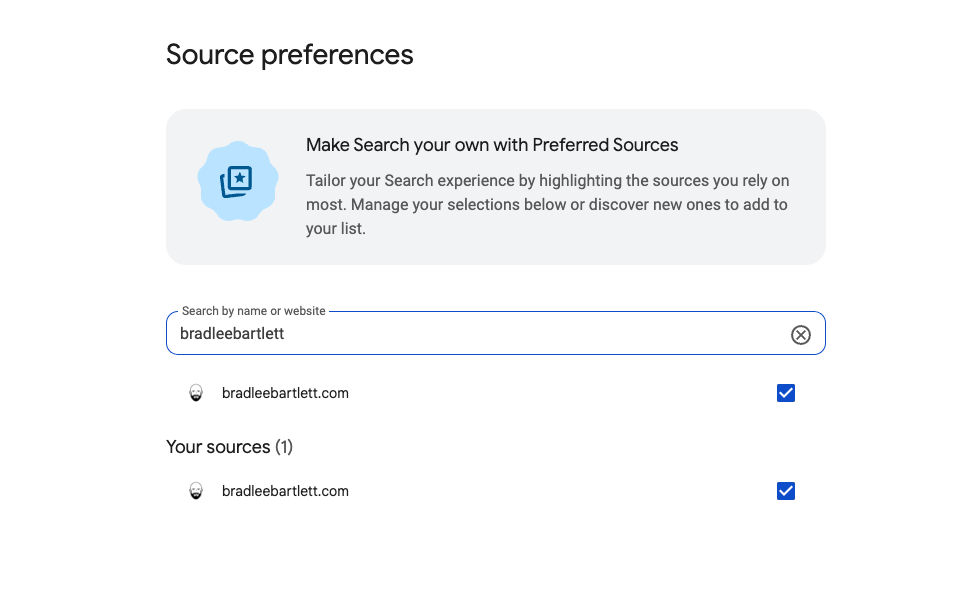
This is what a pass looks like: search your domain at google.com/preferences/source, and if you're in the pool, the checkbox is right there waiting. Check it, and it drops into “Your sources” at the bottom — that’s the whole flow, no confirmation screen, no dashboard telling you who else has done the same.
Google's only stated criterion is that a site “publishes fresh content,” which is vague enough that guessing gets you nowhere. Checking is the only real answer.
One structural detail: only domain- and subdomain-level sites qualify.
A subdirectory — yoursite.com/blog, for instance — doesn't count on its own; it needs to be the whole domain or a proper subdomain.
If your blog lives on the main domain, you're fine. If it's tucked into a folder under someone else's site, this feature isn't available to you yet, regardless of what you publish there.
Why does one site qualify and another doesn't?
Google won't publish the exact criteria, but there's more evidence than most coverage lets on.
The one piece that Google states in its own words: “Sources that aren't updated regularly may not be available.” That's from Google's own consumer help documentation on the feature.
So it seems that publishing cadence and freshness are the single most concrete levers anyone has to take advantage of this.
There's no application process. Nothing in Google's documentation describes a form, a submission, or a review request.
Right now, eligibility is Google's own automated call, drawn from the same signals that already decide whether your content is fresh and trustworthy enough to earn placement in news-oriented results in the first place.
Being selected doesn't override Google's other quality signals either
Google's John Mueller, answering a direct question about this on Bluesky in May 2026, put it this way: “I don't think it makes sense to show spam to users just because of that, but it does help a user to see their preferred sources more.”
A preferred badge is a weighting boost for an audience that already picked you — not a bypass around whether your content clears Google's bar in the first place.
Here's what I won't repeat as fact: the claim, circulating confidently on a few SEO blogs, that a site has to already rank in Top Stories or be registered with Google News before it can show up in the tool at all.
I couldn't find that stated anywhere in Google's own documentation. If it's true, Google hasn't put it in writing anywhere I could find, and I'm not going to launder someone else's guess into a fact just because it sounds specific.
So the most defensible explanation, backed by Google's own words, is publishing consistency.
A site that publishes fresh, regularly updated content is more likely to be in the pool.
A site that posts occasionally is the exact profile Google names as “may not be available.”
That's not the whole picture, because Google isn't handing anyone the whole picture — but it's the one piece of it they've put in writing.
If you're not showing up, the fastest diagnostic isn't a guess. Pull the last 90 days of publishing for the sites in question and compare them side by side.
If the client who shows up has been publishing weekly and the one who doesn't has gone quiet for months, that's your answer (or at least the start of one).
How do you add it?
If you checked — and you're eligible — what's left barely qualifies as a task. It’s easy to throw the switch.
Google offers three paths, and which one fits depends on how much access you have to your own site's code.
3 ways to add the button
01
Standard JavaScript (recommended)
Two lines of code in your site’s head. Google renders a styled, auto-translated button for you.
02
Custom-designed button
Same result, your own design assets. Only worth it if brand consistency matters enough to build it yourself.
03
No-code deeplink
One plain link, no script required. Works in a newsletter or social post too — built for sites that can’t touch their own code.
The first is the one Google recommends (and the one most sites should use): two lines of code in your site's head — a script tag and a div — and Google renders a styled, automatically translated button for you.
If a developer or your CMS gives you any access to page code, this is the version to use.

This is the whole button — what those two lines of code actually render. Google styles it, auto-translates it, and themes it to match light or dark sections. Click it, and a reader adds your site as a Preferred Source without leaving the page.
The second exists for anyone who wants their own design instead of Google's default styling. Same end result, more setup — only worth building if brand consistency matters enough to you to do it yourself.
The third is for anyone who can't touch their site's code at all. It's a plain link — no script, no div — that takes a reader straight to the “add this site” screen. Drop it on a page, in a newsletter, in a social post. If you've been putting this off because you assumed it needed a developer, this is the version built for you.
Is this worth five minutes?
For what it costs, the answer is yes. This isn't a content project, a link-building campaign, or a technical migration thing. It's one check and, if you pass it, two lines of code or a single link.
A citation you don’t control and a lever you do control aren’t the same fight.
This is the second one — but only if you check first.
— Brad Bartlett
The last two posts I wrote in this corner were both about visibility you don't control — Reddit's citation behavior shifting overnight with no explanation, a licensing deal you'll never be offered no matter how good your content is.
So this is the rare exception in that same conversation. It's free, it's fast, and Google is actively investing in it — they shipped a UX fix to the button just last week so a reader lands back on your page instead of getting stranded on Google's confirmation screen.
What I would tell a client is to check the tool today and go from there.
If you want the site-structure side of this conversation too — what else about how your site is built affects whether AI systems can find and cite it — I wrote about that here.
Most brands never separate what's worth five minutes on an AI-visibility checklist from what's a distraction — they either chase every new feature or ignore all of them.
Start with a GEO Visibility Audit and I'll tell you which is which — starting with what's already sitting there unclaimed.
How much of your AI-visibility checklist is worth five minutes — and how much is a distraction?
Most brands never separate the two. They either chase every new feature or ignore all of them. A GEO audit is where I tell you which is which, starting with what’s already sitting there unclaimed.
I audit the prompts, sources, and content gaps behind your actual AI-search presence — then help you build the evidence worth citing.
Book a GEO Visibility Audit →Fiverr Pro vetted · 4.9 stars · 1,600+ client reviews
Made with 💙 in kcmo
FAQ
Does adding the Preferred Sources button guarantee I'll show up in AI Overviews?
No. The button only lets readers select your site if it already appears in Google's source preferences tool. Embedding the code on a site that isn't eligible does nothing — check first at google.com/preferences/source.
How do I know if my site is eligible to be a Preferred Source?
Search your own domain in Google's source preferences tool. Google states that any site that publishes fresh content is eligible, but doesn't publish a full checklist beyond that — the tool itself is the only reliable way to confirm.
Do I need a developer to add this?
Not necessarily. The standard implementation is two lines of code in your site's HTML. If you can't touch your site's code at all, Google also supports a plain link you can add anywhere, including a newsletter or social post, with no code required.
Does this work for a subdirectory, like a blog on a subdomain of a bigger site?
Only domain-level and subdomain-level sites are eligible — for example, code.example.com can qualify, but example.com/blog as a subdirectory can't.
Is this a ranking factor?
Not in the traditional sense. It's a visibility layer — a preferred badge shown to a reader who selected you — not a change to how Google ranks your content in search results generally.
How This Was Made
Every claim above was checked directly against Google's own documentation before publishing. Researched, directed, and signed off by Brad Bartlett — the name on this post is the name accountable for what's in it.

Written by
Brad Bartlett
Brad is a copywriter and content strategist who helps creators, brands, and organizations build content that's actually worth reading — and built to be found. He specializes in conversion-focused copy, brand voice, and SEO and AI search optimization, with a straightforward philosophy: great content has to be authentic before it can perform. He works comfortably across the AI content space, helping clients use the tools without losing the voice. Fiverr Pro vetted, 4.9 stars out of 5 across 1,600+ clients.